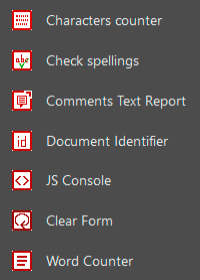
abracadabraTools 2026 is a set of free plugins that add several useful features to Acrobat Reader, Acrobat Pro and Acrobat Standard
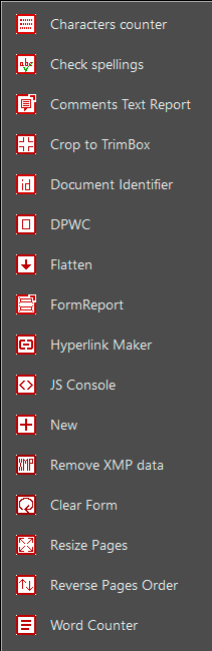
abracadabraTools adds some or all of this features in the Add-on Tools pane and in the Edit menu or in the Hamburger menu in the new UI for Windows:
-
-
- CharactersCounter: counts the number of words contained in a single page or in the entire document. Results are shown in the JS Console, making the result easy to copy and export.
- CheckSpelling (Inspecter l’orthographe) : checks all words in the document, unlike the built-in Acrobat feature, which only allows to check words contained in form fields and comments. Suspicious words are highlighted with an annotation.
- CommentsTextReport: reports all the comments in the document as text in the JS Console, making the result easy to copy and export.
- CropPages: crops all pages to TrimBox in the current document (Does not work with Acrobat Reader).
- DocID: adds a quick Comparison tool that displays the Permanent identifier [ID] of the PDF file. More details.
- DPWC (Delete Pages Without Comments): deletes all pages without comments in the current document, if there are no comments inside the document will be left untouched (Does not work with Acrobat Reader).
- Flatten: combines (flatten) form fields and annotations so they become part of the document content (does not work with Acrobat Reader).
- FormReport : generates a complete CSV report on all form fields contained in a PDF form (does not work with Acrobat Reader).
- HyperlinkMaker: adds hyperlinks to all occurrences of the searched word. More details (Does not work with Acrobat Reader).
- JSConsole (Console JS) : displays the JavaScript Console (this feature already exists in Acrobat Pro, this plugin is primarily intended for Acrobat Reader and Acrobat Standard).
- NewDocument: creates a new blank document in one clic. 47 standard formats available (Does not work with Acrobat Reader).
- Remove-xmpMM : sremove XMPmm tags. The xmpMM tags often contain private information about the history of a file which should not be made public (Does not work with Acrobat Reader).
- ResetForm : resets all form fields in the document (this feature already exists in Acrobat Pro, this plugin is primarily intended for Acrobat Reader and Acrobat Standard).
- ResizePages: resize PDF pages or PDF zones within a document, either throughout the entire document or only on certain pages (Does not work with Acrobat Reader).
- ReversePageOrder: reverses the order of pages in the document (Does not work with Acrobat Reader).
- WordsCounter: returns the number of words contained in a single page or in the whole document (available in 6 languages, language selection is automatic).
-
abracadabraTools does not impose anything: only install the tools you need.
abracadabraTools works on macOS and Windows with Acrobat Reader, Acrobat Pro or Acrobat Standard X(10) or later versions.
abracadabraTools is available in English and French, the language selection is automatic.
Older versions of abracadabraTools are available on request.
My apologies to anyone who would have preferred tools to be listed alphabetically in the menu or in the Add-On tools panel. I did what I could, but Acrobat does not support this feature. Any complaints or claims should therefore be addressed directly to Adobe.
The new Acrobat interface still displays generic icons instead of the beautiful custom icons shown in the screenshots above.
It’s been a little over three years since I reported this issue to Adobe… The important thing is to never give up hope!